Introduction to Media Queries
What are Media Queries?
Responsive Design & Media Queries are a feature of CSS that allows the application of different styles based on the properties of the user’s device, such as screen width, height, orientation, and resolution.
Media queries are most commonly used to make websites responsive, adjusting layout and design elements based on the viewport size.
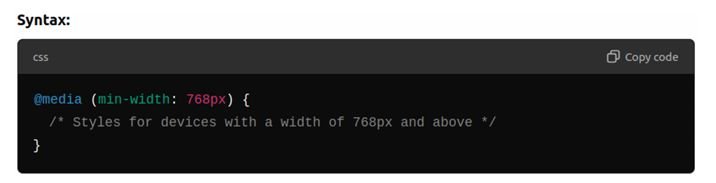
- Media queries can target specific breakpoints (e.g., mobile, tablet, desktop).
- Min-width applies the styles to screen sizes greater than or equal to the specified width.
- Max-width applies the styles to screen sizes less than or equal to the specified width.
Common Breakpoints:
- Mobile (small devices):
- Typically used for devices with a screen width of up to 600px.
- Example

2. Tablet (medium devices):
- Target screens with a width between 600px and 900px.
- Example

3. Desktop (large devices):
- Generally for screens wider than 900px.
- Example

Adjusting Layouts for Different Screen Sizes
Responsive Layout Adjustments
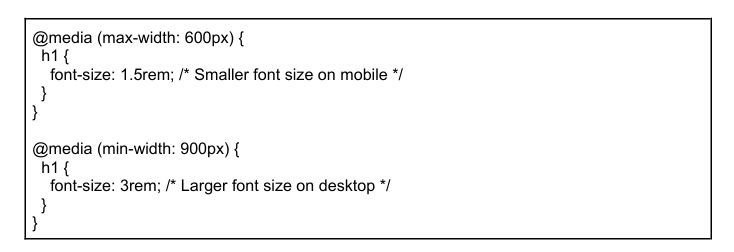
- Font Sizes and Spacing:
- Adjust font sizes, line heights, and padding to ensure readability on smaller screens.
- Example
- Product Grid Adjustments:
- On smaller screens, display product grids as single-column layouts, and switch to multi-column grids for larger screens.
- Example

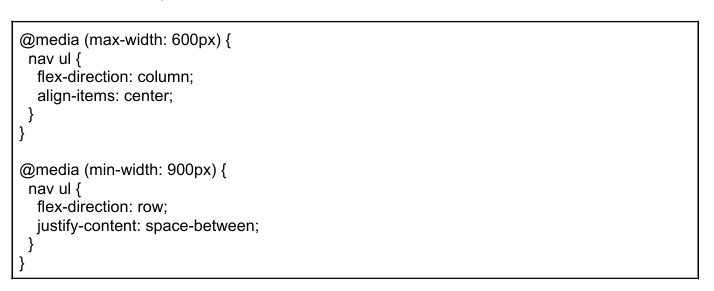
- Header and Navigation Adjustments:
- For mobile views, simplify the navigation into a hamburger menu or stack the links vertically.
- Example:
Mobile-First Design Approach
What is the Mobile-First Approach?
The mobile-first approach means designing the website layout and styles for mobile devices first, and then scaling up the design for larger screens. This approach ensures that the website is optimized for smaller screens, where space is limited, and progressively enhances the design for larger screens.
Why is this important?
Mobile traffic now represents the majority of website visits, making it essential to prioritize mobile usability. It helps with performance optimization, ensuring that mobile users receive a faster experience.
How to Implement Mobile-First Design?
- Start with the default styles for small screens (mobile).
- Add media queries for larger screens (tablet, desktop) as needed.
Testing Responsiveness with Browser DevTools
- Chrome DevTools and other browsers provide a powerful device simulation feature to test websites across multiple screen sizes without needing physical devices.
- Students will learn how to
- Open DevTools (right-click-> Inspect or press Ctrl + Shift + I).
- Click on the Toggle Device Toolbar button (Ctrl + Shift + M) to simulate different devices.
- Select from a list of common devices (iPhone, iPad, etc.) or enter custom screen
- sizes to test the responsiveness of their design.
If this tutorial was helpful please feel free to comment box section below.
Understanding how Media Queries work is key for truly responsive layouts – I found a helpful overview of responsive design principles, including some visual examples This tutorial is a good starting point for getting a handle on the CSS itself.